Guidance to Virtual Private Servers
What exactly is VPS, how does it work, and how can businesses leverage it to maximize their ROI? Keep reading this guide to learn everything you need to know about VPS.
Index
- What is a VPS?
- VPS vs Shared web hosting
- VPS use cases
- Benefits of VPS
- How does a VPS work?
- Difference between VPS and alternatives
- VPS market overview
- How to use VPS: 5 best practices
What is a VPS?
Although technically you are sharing resources with other users, your resources are guaranteed. You pay a set amount assigned to your VPS, which can’t be used by another account.
VPS
Shared webhosting is only for simple websites. As soon as you are thinking about an application you are not going for shared web hosting. Application can also be data processing applications, extracting data from external sources and store it in a data store. In this article it is really zoomed in on Shared web hosting but it is just one way to use a VPS. So several solutions for a web application are, Hosting it on premise, Cloud hosting using VPS-s, Serverless, or use a SaaS solution. But it depends on how much responsibility you want to take care of yourself. The starting point of this article not correct.
VPS use cases
Gaming server - a good gaming server needs to have solid compute and memory attached to it to deliver a great experience. VPS provides that - its scalability lets you start small and grow resources as needed, and speed delivers a great experience to players.
Benefits of VPS
Scalability
The scalability of hosting resources without technical concerns or downtime is key. When you host using a VPS, the environment is hosted in a container, which is given a set quantity of resources based on the package you choose. But when things change, you can quickly assign fewer or more resources to match the current demand.
Greater reliability
IVPS hosting provides reliability and stability as in most circumstances, a single node hosts only a few servers, which contributes to performance and uptime.
Managed service
Upgrading your servers to VPS doesn’t require you to operate your own server. The majority of hosting companies offer VPS hosting and will handle a lot of tasks for you - security, maintenance, and updates. At the same time, you get full customization control over the choice of OS and others.
The provider makes sure that everything runs smoothly in line with Infrastructure-as-a-Service setup, for example by updating it on a regular basis. Abbreviated "IaaS," Infrastructure-as-a-Service is a type of cloud computing that provides basic compute, network, and storage capabilities to customers on-demand, through the internet, and on a pay-as-you-go basis. In contrast to PaaS and SaaS, IaaS enables the most granular control over cloud resources.
Enhanced sustainability
Eco-friendly technology and green hosting are buzzy topics, and many businesses are now planning to limit their carbon footprint in line with regulations.
VPS can help you achieve this goal because it lets you use resources more efficiently, scaling up and down according to current demand. A dedicated server often ends up creating waste - which translates into the sustainability profile of the company operating it.
Note that some providers are transparent about their hosting choices and show that the data centers they use are sustainable - take this into account when picking a VPS provider.
Growth potential
Prices are projected to continue to reduce due to advancements in virtualization technologies. While pricing varies per provider, you may expect to save a significant amount of money by switching to a VPS. Still, it’s a good idea to check prices before selecting a service provider since this will affect how much you pay on a monthly basis.
Dedicated resources
If you take 100% of the resources, VPS will offer a dedicated hosting solution. This means that you can handle a lot more traffic without increasing spending, making it a win-win situation.
Tilaa Cloud VPS - Reliable cloud
For developers who are looking for a flexible, fast and secure cloud solution to build and grow their business.

How does a VPS work?
VPS works by allowing several virtual servers to be created on a single piece of hardware, using the following components:
- VPS node – a node is a physical piece of hardware that can contain a number of virtual servers.
- Hypervisor – it runs on the VPS node and handles resource allocation, protecting system resources like storage and RAM, and ensuring that each virtual private server satisfies user expectations. Hypervisors restrict one virtual server from accessing resources that belong to another server.
- Virtual server – the virtual server operates within the hypervisor's partition, it’s just like a dedicated server, complete with its own operating system and applications. Users can install, reboot, or format their virtual server while the VPS node remains unaffected.
- Operating system – VPS has its own OS and users can install their operating system from an ISO image they supply to the server. Many hosting providers include a selection of operating systems as part of the package.
- Dedicated IP address – in some circumstances, the host may supply more than one IP address per account, or you can purchase more IP addresses.
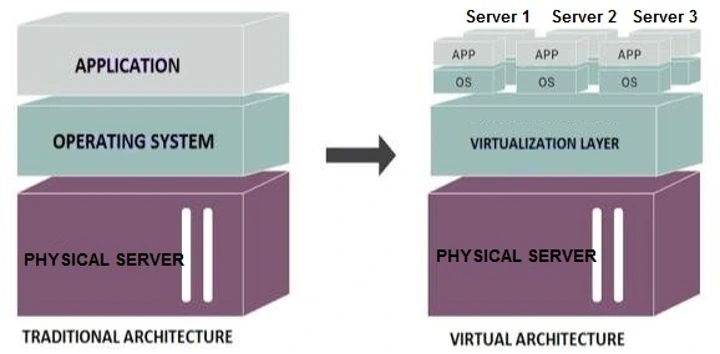
A VPS is based on virtualization, a technology that the hosting company uses to create a completely different environment for your website. The virtual servers are produced and maintained by a device known as a hypervisor.
A hypervisor can be put on top of the physical server's operating system. Its role is to build the virtualization layer that separates your VPS from the underlying infrastructure and the other virtual machines. This lets your VPS function as a completely independent system.
The hosting provider then configures the parameters of your virtual server via the hypervisor. They determine the number of CPU cores, RAM, and available storage space. In contrast to a shared account, these resources are just for your server, guaranteeing their availability.
Since your virtual server functions similarly to a physical system, it has its own dedicated IP address. The hypervisor assigns this address, and support specialists install the operating system. The majority of web hosting servers run Linux; however, virtualization technology allows hosting providers to install Windows or even macOS on your VPS.
Virtual private server accounts are classified into two types:
- VPS that you can manage yourself - you have complete control of your server. You’re granted root access, and it is your responsibility to install all of the tools and software required to create the hosting environment. You must also configure the server, carry out software updates, and perform other administrator activities.
- VPS with a web hosting control panel - the provider can give you a helping hand by installing a web hosting control panel for you, but you should not expect any kind of hand-holding. If you don't have the technical abilities to set everything up, getting the most out of this type of service will be difficult.
Difference between VPS and alternatives
Different types of web hosting allow you to customize your server to varying degrees. They differ in terms of pricing, performance (like page load time), and service availability (uptime). How does VPS hosting compare to other hosting options?
Shared web hosting
Web apps and websites that receive little traffic are usually recommended for this option. Even with the best shared web hosting package, you share the same physical server with a number of other hosting business clients. Because your site operates on the same operating system as everyone else's, you don’t receive dedicated resources.
As a result, the demands of other service users have an impact on the memory and computing power that are available at your site. For example, if a website hosted on the same server experiences a sudden rise in traffic, the page load time may increase.
Also, note that you can’t select your operating system or other server software because everyone uses the same configuration. Your hosting provider is in charge of every aspect of your shared hosting environment.
Dedicated cloud server hosting
In this scenario, you rent a whole physical server for your business with dedicated hos ting – this known as renting Bare Metal. If you have a high-traffic website, dedicated hosting may be the ideal option because dedicated servers are fast, flexible, and completely customizable. It’s more cost-effective, but more management tasks fall on your shoulders.
However, the service does come with a high price tag, so it’s not for everyone, especially if you run a tiny or medium-sized website.
Dedicated hosting, unlike VPS hosting, allows you to choose and customize your operating system and server software. It lets you configure not just the software but also the hardware, as the entire server is yours and no one else has any say in the setup. You can also run a dedicated server on-site (for example, in your workplace), but you will lose the support of a professional hosting team.
Compared to the options above, one of the most significant disadvantages of VPS hosting is having to handle the complete server environment on your own. You may face security issues or performance loss if you fail to properly configure and maintain your virtual server.
This is where managed VPS hosting services come in to address this issue. Consider it an improved version of VPS hosting that includes complete technical assistance.
VPS market overview
The virtual private server market is likely to benefit due to the increase in cyberattacks and a jump in demand for cloud-based security solutions. The integration of machine learning (ML) and artificial intelligence (AI) with VPS is likely to increase the spread of VPS solutions globally.
According to the US-based Ixia, 90% of IT workers are concerned about the security of their data and applications in the cloud. VPSs are the greatest way for small to medium-sized organizations to gain mobility as they embrace private and public cloud services to revolutionize their business operations.
In addition, rising trends such as bring your own device (BYOD) present considerable development opportunities for the VPS industry. According to Cisco, 95% of firms allow personal devices in the office in some capacity, with the remaining 5% likely being high-security focused. This will position VPS hosting, BYOD, and cloud computing to become the most practical ways of conducting business.
How to use VPS: 5 best practices
1. Configure infrastructure resources
When you buy a VPS, you buy a specific plan with precise computational power and memory, but you may not be able to choose the RAM or CPU manufacturer. Your infrastructure staff must be ready for this.
Also, the more complicated your VPS solution, the more time, work, and personnel it will demand, resulting in increased expenses. Be prepared for that and add this to your cost forecast.
The best way to start small and scale up your VPS setup, especially since scaling down might be problematic.
2. Monitor your costs
Since VPS is a scalable solution, you need to keep tabs on the costs it generates in relation to how your application’s demand changes. When selecting a VPS, make sure that the company provides expense allocation and monitoring tools. They will assist you in analyzing costs and determining which teams or services are responsible for them.
Note that the provider will offer you access to precise utilization metrics. You won’t need to deal with any hidden costs either, thanks to the fully transparent pricing schemes many VPS providers use.
3. Pick a VPS that helps you achieve compliance
Local rules may apply depending on your sector, geographic area, and the data you operate with. European data privacy and security laws differ from those in the United States, where all cloud hyperscalers are headquartered. As a result, such solutions are frequently found to be in violation of European regulations.
When selecting a VPS, consider the kind of data you’ll be placing there and the particular regulations that may apply to this data. You should consider where the data is hosted to ensure that the provider adheres to the same regulations as your company. Keep in mind that a VPS is not a single-tenancy cloud architecture, and you will be sharing server resources with other users.
You know exactly where your data is hosted when you use the services of a smaller cloud provider. Tilaa, for example, runs data centers within the EU, ensuring that all of your sensitive data is GDPR-compliant by default.
4. Secure your VPS against common vulnerabilities
Like any online platform, VPS hosting is vulnerable to cyberattacks. DDoS assaults, which flood servers with traffic, can crash or disable them. Your VPS might potentially be infected with malware that damages data and disrupts operations, or brute-force assaults use automated programs to repeatedly crack login credentials.
To safeguard your VPS, you must adopt strong security measures that mitigate these dangers and protect your data and system integrity. You start in a secure setup, but since you have full control, securing it onward is your responsibility.
Knowing the difference between managed and unmanaged hosting is crucial to VPS security. In managed VPS hosting, the provider handles server security. This includes software upgrades, system monitoring, backups, and security fixes. Unmanaged VPS hosting requires you to administer and maintain security.
Also, don’t forget about the provider - they need to be secure as well. Be sure to check the company’s level of security and certifications before signing the contract.
5. Improve both user and process authentication
Authentication often turns out to be the weakest link in VPS security. Whether it's team members or software processes, authentication is frequently the point of entry for cybercriminals.
Make sure that everyone on your team adheres to the strong password guidelines (8 to 15 characters, including alphanumeric and special characters). Administrators should consider automating password management with a password manager that works across the VPS. Ideally, it should work across the complete collection of VPS hosted on a physical server.
Passwords for people and processes should be supplemented by multi-factor authentication, which adds an extra layer of protection. When hackers compromise VPS credentials and breach the first security layer, this layer becomes important. One good idea is to introduce procedures such as one-time passcodes produced on a separate device when implementing MFA.